
Change Password
Users have the ability to change the password within the credentials of your proxy list. You can do so within the Residential section on our website dashboard.
This is a very useful tool for a few reasons:
- If you want to stop all of your residential data usage.
- If you believe someone else may have access to your proxy list and you want to change the access credentials.
How to change your residential password
Section titled “How to change your residential password”- Navigate to the Residential Section on the website
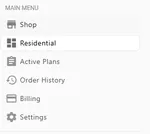
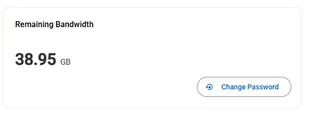
- Select the Change Password button
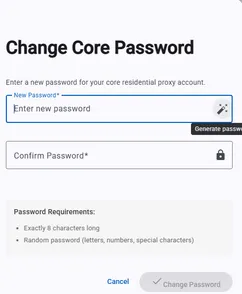
- Enter your new credentials. You can press the wand button on the right side to automatically select a random password. Select the ☑️Change Password button to confirm and finalize your password change!
- IMPORTANT: Make sure to re-generate your residential proxy lists after changing your password. Your previous proxy lists will not work.
Note: This function is only available within the website dashboard in the Residential section, and is not available within the discord bot.
Notes: Residential proxy password changes may take 5-15 minutes to fully take effect before updated credentials begin to work again, so please make sure your password changes are intentional to avoid any interruptions.